> ## Documentation Index
> Fetch the complete documentation index at: https://docs.komodor.com/llms.txt
> Use this file to discover all available pages before exploring further.
# Concepts & glossary
> The vocabulary of the platform — agents, runs, workflows, modules — and how the pieces fit together.
The Komodor Agentic Operation Platform (KAOP) has a small vocabulary, and almost everything else in
these docs is built from it. This page defines each term once and shows how they relate, so the rest
of the documentation reads without guesswork. Read it end to end the first time; come back to it
whenever a word feels ambiguous.
## The shape of the platform
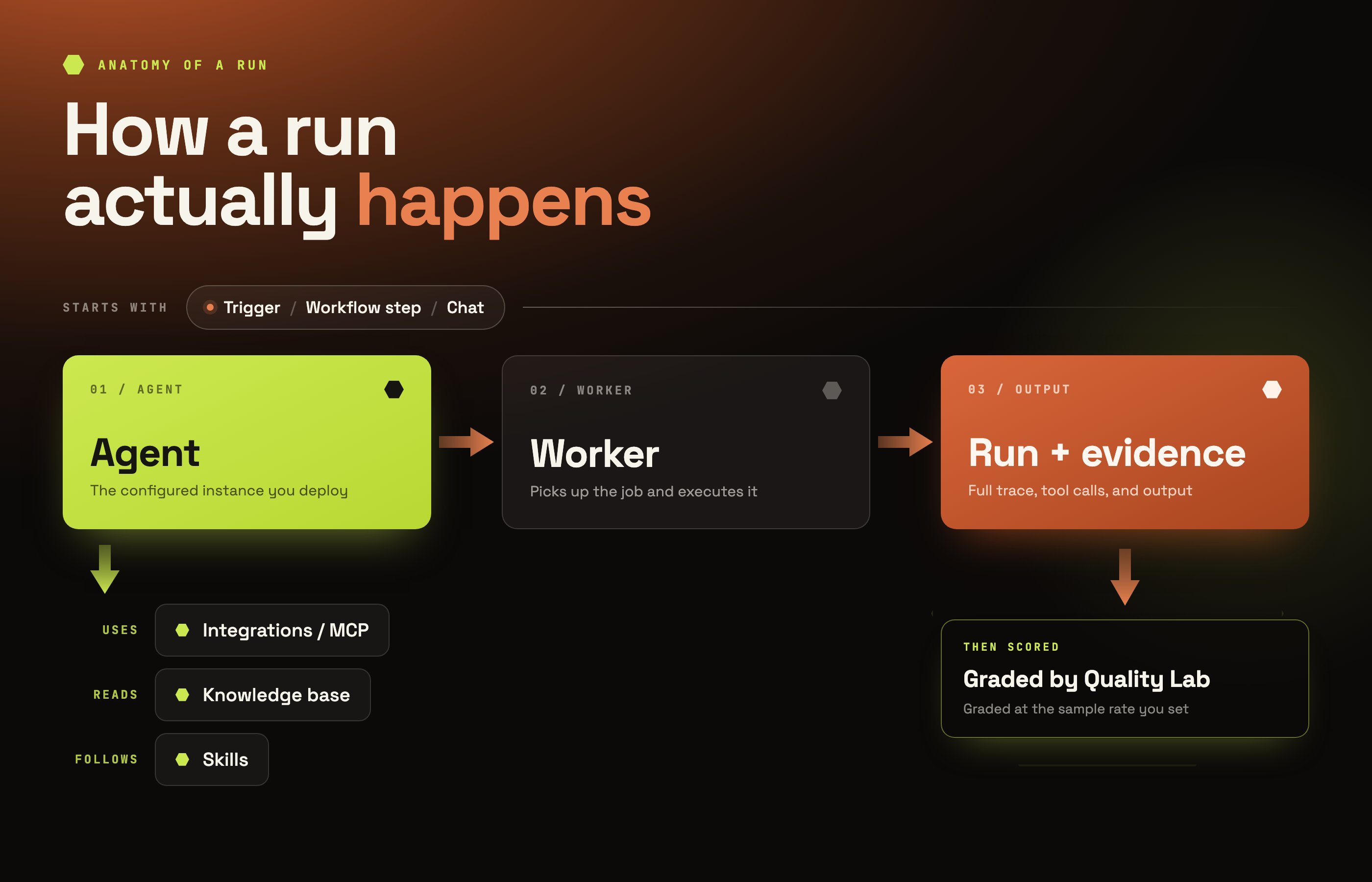 KAOP is a control plane. You give it agents, connect the systems those agents need to reach, and
decide what starts them. It runs them, records everything they did, governs what they were allowed
to do, and measures how well they did it.
KAOP is a control plane. You give it agents, connect the systems those agents need to reach, and
decide what starts them. It runs them, records everything they did, governs what they were allowed
to do, and measures how well they did it.
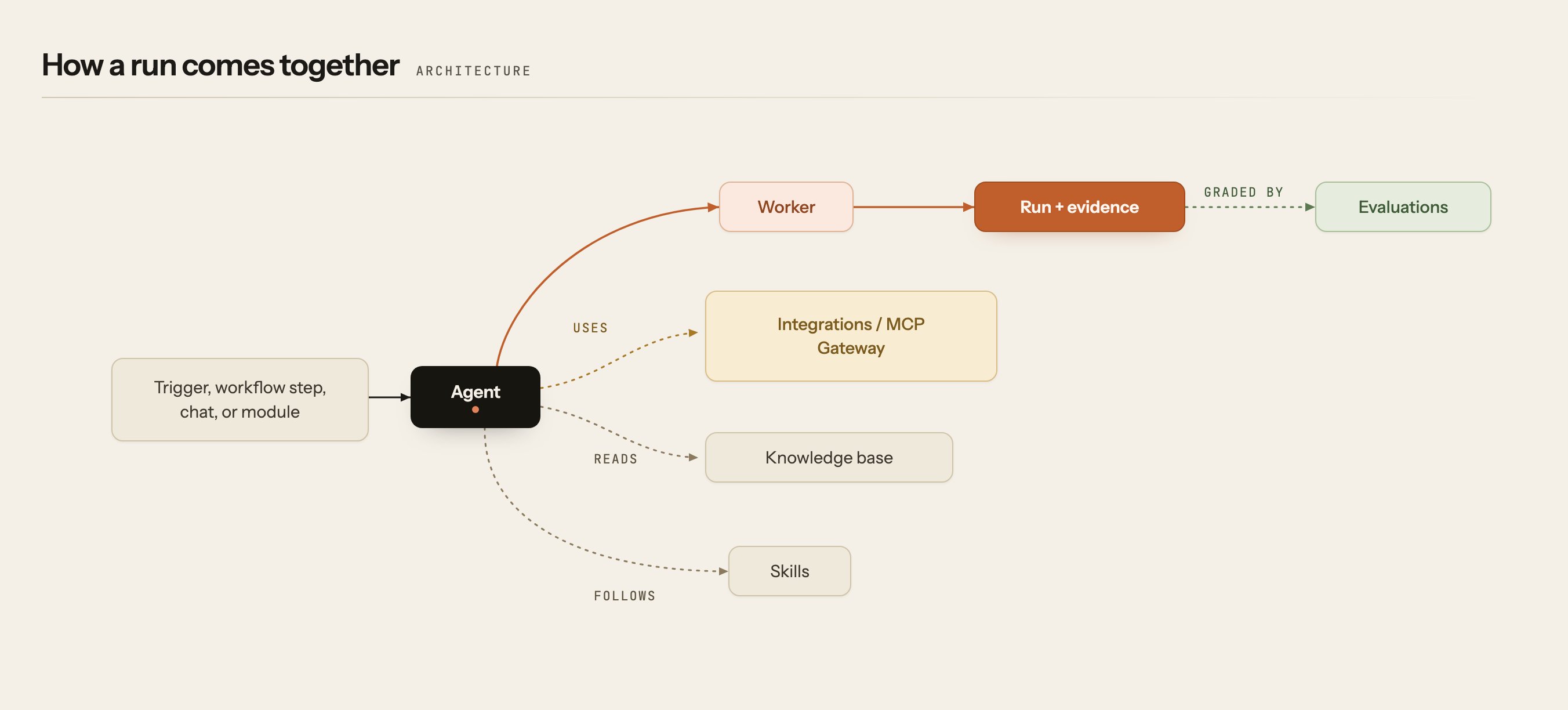 ## The core objects
### Agent
The governed identity and behavior that does the work — its instructions, the tools it may reach,
the permissions it holds, and its history. An agent is the thing you create, name, deploy, and
grant access to. It is also a **principal**: KAOP authorizes an agent's actions the same way it
authorizes a person's.
### Worker
The process that runs an agent. One worker runs one agent. You care about workers when you are
deploying or debugging — is it online, is it reachable, what version is it running — and you care
about agents the rest of the time.
### Run
One execution of an agent, together with its full evidence trail: the input it received, the tools
it called, the reasoning it produced, its output, and what it cost. A run is the unit you inspect
when you want to know what actually happened.
### Skill
A reusable unit of know-how — a runbook, a procedure, a pattern — attached to an agent. Skills are
how you give an agent your team's operational knowledge without rewriting its instructions.
### Knowledge base
Documents you create and upload, indexed so agents can search them at run time and cite what they
used. Where skills tell an agent *how* to work, the knowledge base tells it *what you know*.
## How work starts
### Trigger
A recurring cron schedule that starts an agent run. Triggers live in the trigger registry.
Inbound webhook endpoints are not triggers. If you want an external system to start work by posting
to a URL, you create an **endpoint** under Integrations → Endpoints.
### Channel
A messaging surface — Slack today — where people invoke agents and receive results in the place they
already work. A channel's routing rules decide what each inbound message does.
### Workflow
**A sequence of steps. Each step delivers a task to one or more agents.** A workflow is how you get
several agents to cooperate on something bigger than one run: one step correlates alerts, the next
investigates, the next proposes a remediation. Steps are bound to agents, and a step with no agent
bound still has a task — it just has nothing to execute it.
### Module
**An operational outcome you own — and a module contains workflows.** "Incident management &
troubleshooting" is a module;
"detect, group, and investigate a production incident" is the outcome it owns; the workflows inside
it are the automation that delivers it.
**Module versus workflow** is the distinction worth getting right early. A module is the *what* —
the domain you are accountable for. A workflow is the *how* — a configured sequence of steps inside
that module. You enable a module for your workspace; you operate its workflows.
## How agents reach the outside world
There are exactly two ways, and every connection is one of them:
| Path | Use it when | Where |
| ------------------------ | ------------------------------------------------------------------------------------------------- | -------------------------- |
| **Built-in integration** | The system is in the catalog — Datadog, AWS, Azure, GitHub, Slack, Kubernetes, PagerDuty and more | Integrations |
| **MCP Gateway** | You want to expose your own tool surface — any MCP server or OpenAPI endpoint | Integrations → MCP Gateway |
Both paths use the same underlying mechanism for secrets:
### Credential
A stored secret, encrypted at rest, bound to the agents allowed to use it and delivered to a run
without ever exposing its value to you or to the agent's logs.
### Integration group
A named bundle of integrations you attach to an agent as a set, instead of wiring tools one at a
time.
## Quality and improvement
| Term | What it means |
| -------------- | -------------------------------------------------------------------------------------------- |
| **Evaluation** | Grading a run against explicit criteria. A verdict is itself a run you can open and inspect. |
| **Judge** | The LLM or agent that performs the grading. |
| **Rubric** | The named criteria a judge grades against. |
| **Verdict** | The result, with its per-criterion reasoning. |
| **Shadow** | Running a candidate agent alongside the live one without serving its output. |
## Governance
| Term | What it means |
| ---------------------- | ----------------------------------------------------------------------------------------------------------- |
| **Workspace** | The tenant boundary — your account, its members, agents, and data. |
| **Role** | A bundle of permissions assigned to a member, service account, or agent. |
| **Service account** | A non-human identity for automation, with its own grants and keys. |
| **Guardrail / policy** | A deterministic rule that blocks an action, holds it for approval, redacts a matched value, or alerts only. |
| **Approval** | A risky action paused for a human decision, with the evidence needed to make it. |
| **Audit log** | The append-only record of sensitive actions and access decisions. |
## Next steps
How the control plane and your agents fit together.
The outcome catalog, and how modules contain workflows.
Author your own or deploy one of ours.
Every way to work with KAOP — console, API, SDKs, MCP, Slack.
## Related topics
- [How it works](/manage-your-agents/build/how-it-works.md)
- [Modules & workflows](/modules-and-workflows/overview.md)
- [Before you begin](/get-started/before-you-begin.md)
- [Overview](/get-started/overview.md)
- [Knowledge base](/manage-your-agents/build/knowledge-base.md)
## The core objects
### Agent
The governed identity and behavior that does the work — its instructions, the tools it may reach,
the permissions it holds, and its history. An agent is the thing you create, name, deploy, and
grant access to. It is also a **principal**: KAOP authorizes an agent's actions the same way it
authorizes a person's.
### Worker
The process that runs an agent. One worker runs one agent. You care about workers when you are
deploying or debugging — is it online, is it reachable, what version is it running — and you care
about agents the rest of the time.
### Run
One execution of an agent, together with its full evidence trail: the input it received, the tools
it called, the reasoning it produced, its output, and what it cost. A run is the unit you inspect
when you want to know what actually happened.
### Skill
A reusable unit of know-how — a runbook, a procedure, a pattern — attached to an agent. Skills are
how you give an agent your team's operational knowledge without rewriting its instructions.
### Knowledge base
Documents you create and upload, indexed so agents can search them at run time and cite what they
used. Where skills tell an agent *how* to work, the knowledge base tells it *what you know*.
## How work starts
### Trigger
A recurring cron schedule that starts an agent run. Triggers live in the trigger registry.
Inbound webhook endpoints are not triggers. If you want an external system to start work by posting
to a URL, you create an **endpoint** under Integrations → Endpoints.
### Channel
A messaging surface — Slack today — where people invoke agents and receive results in the place they
already work. A channel's routing rules decide what each inbound message does.
### Workflow
**A sequence of steps. Each step delivers a task to one or more agents.** A workflow is how you get
several agents to cooperate on something bigger than one run: one step correlates alerts, the next
investigates, the next proposes a remediation. Steps are bound to agents, and a step with no agent
bound still has a task — it just has nothing to execute it.
### Module
**An operational outcome you own — and a module contains workflows.** "Incident management &
troubleshooting" is a module;
"detect, group, and investigate a production incident" is the outcome it owns; the workflows inside
it are the automation that delivers it.
**Module versus workflow** is the distinction worth getting right early. A module is the *what* —
the domain you are accountable for. A workflow is the *how* — a configured sequence of steps inside
that module. You enable a module for your workspace; you operate its workflows.
## How agents reach the outside world
There are exactly two ways, and every connection is one of them:
| Path | Use it when | Where |
| ------------------------ | ------------------------------------------------------------------------------------------------- | -------------------------- |
| **Built-in integration** | The system is in the catalog — Datadog, AWS, Azure, GitHub, Slack, Kubernetes, PagerDuty and more | Integrations |
| **MCP Gateway** | You want to expose your own tool surface — any MCP server or OpenAPI endpoint | Integrations → MCP Gateway |
Both paths use the same underlying mechanism for secrets:
### Credential
A stored secret, encrypted at rest, bound to the agents allowed to use it and delivered to a run
without ever exposing its value to you or to the agent's logs.
### Integration group
A named bundle of integrations you attach to an agent as a set, instead of wiring tools one at a
time.
## Quality and improvement
| Term | What it means |
| -------------- | -------------------------------------------------------------------------------------------- |
| **Evaluation** | Grading a run against explicit criteria. A verdict is itself a run you can open and inspect. |
| **Judge** | The LLM or agent that performs the grading. |
| **Rubric** | The named criteria a judge grades against. |
| **Verdict** | The result, with its per-criterion reasoning. |
| **Shadow** | Running a candidate agent alongside the live one without serving its output. |
## Governance
| Term | What it means |
| ---------------------- | ----------------------------------------------------------------------------------------------------------- |
| **Workspace** | The tenant boundary — your account, its members, agents, and data. |
| **Role** | A bundle of permissions assigned to a member, service account, or agent. |
| **Service account** | A non-human identity for automation, with its own grants and keys. |
| **Guardrail / policy** | A deterministic rule that blocks an action, holds it for approval, redacts a matched value, or alerts only. |
| **Approval** | A risky action paused for a human decision, with the evidence needed to make it. |
| **Audit log** | The append-only record of sensitive actions and access decisions. |
## Next steps
How the control plane and your agents fit together.
The outcome catalog, and how modules contain workflows.
Author your own or deploy one of ours.
Every way to work with KAOP — console, API, SDKs, MCP, Slack.
## Related topics
- [How it works](/manage-your-agents/build/how-it-works.md)
- [Modules & workflows](/modules-and-workflows/overview.md)
- [Before you begin](/get-started/before-you-begin.md)
- [Overview](/get-started/overview.md)
- [Knowledge base](/manage-your-agents/build/knowledge-base.md)