> ## Documentation Index
> Fetch the complete documentation index at: https://docs.komodor.com/llms.txt
> Use this file to discover all available pages before exploring further.
# Data flow
> Trace job inputs, credentials, tool traffic, and evidence so you can assess what crosses your deployment boundaries.
Trace what an agent receives, what it sends to tools and models, and what becomes part of the
durable run record.
The Komodor Agentic Operation Platform (KAOP) sends jobs to workers and receives execution
evidence in return. A worker running in your
environment can still send run content to the control plane, an MCP server, or a model provider, so
network location and data exposure must be reviewed separately.
This page follows a run end to end and distinguishes credential masking from the treatment of other
sensitive content.
## Before you assess a deployment
Identify:
* Where the worker and control plane run.
* Whether the worker receives invocations through a reverse channel or a directly reachable
endpoint.
* Which tool, MCP, and model endpoints it uses.
* Which credentials are bound to the agent or gateway server.
* What the worker emits in spans, logs, progress messages, artifacts, and output.
The following tables describe the documented SDK and platform paths. Review custom code and any
separate logging or model-client paths as part of your own deployment; do not assume that arbitrary
process output is governed by the SDK's event handling.
## The two directions between worker and control plane
**Downstream traffic is the job:** the prompt, structured input, context, identifiers, and
credentials required for that execution.
**Upstream traffic is telemetry and lifecycle:** presence, execution events, status, usage, and
output.
The invocation envelope uses A2A JSON-RPC 2.0. Telemetry and lifecycle use JSON through the
authenticated worker interfaces. Worker-to-control-plane communication uses TLS and worker-token
authentication, with run events batched on the uplink.
For a private worker, the job travels down the reverse SSE connection that the worker initiated.
Direct HTTP is also supported where the control plane can reach the worker. “Job travels to the
worker” therefore does not necessarily mean an inbound network connection was opened to it.
## What the job carries
| Field | Purpose | Content implications |
| -------------------------- | ---------------------------------------------------------------- | ------------------------------------------------------------------- |
| **Prompt** | Instructions for this execution. | Can contain task or sensitive content. |
| **Input** | Structured parameters, such as an alert payload. | Can contain task or sensitive content. |
| **Chat context** | Prior messages, selected model, and session ID for a chat agent. | Previous conversation content accompanies the current request. |
| **Run and event IDs** | End-to-end correlation. | Identifiers rather than task content. |
| **Run-scoped credentials** | Bound LLM, tool, or MCP access needed for the run. | Secrets held in memory by the SDK for the run, not persisted by it. |
Credential delivery to a worker is not the same as placing a secret in the agent's prompt or model
context. A credential may be consumed by the runtime or retained and injected by a gateway when
authenticating an approved connection.
The security reference states that rotating a stored credential affects the next run without
redeploying the agent. Do not infer that a rotation replaces every value already held by an
in-flight run.
## What returns as evidence
| Signal | What it carries | Can contain run content? |
| ------------------------------------------------------------------------------ | -------------------------------------------------------------------------------------------------------- | ---------------------------------------------------------------------------------------- |
| **Heartbeat**, approximately every 10 seconds in the documented Python runtime | Agent identity and advertised metadata: version, model, tools, input schema, triggers, and capabilities. | No task payload in the documented heartbeat; the metadata can still describe your agent. |
| **Spans** | Agent, model, and tool trace structure, status, and timing; tool arguments/results and root output. | Yes. |
| **Logs** | Level and message text. | Yes. |
| **Progress messages** | Role and content displayed during execution. | Yes. |
| **Token usage** | Token counts and cost. | Accounting rather than prompt text. |
| **Lifecycle and output** | Start, completion with output/usage, or failure with an error. | Yes. |
| **Artifacts** | Files and reports emitted as run evidence. | Yes, depending on the artifact. |
The control plane persists the reported evidence. The run view is therefore a view of what was
emitted, not an assurance that all local data remained local or that all process activity was
captured.
## Follow one alert-driven run
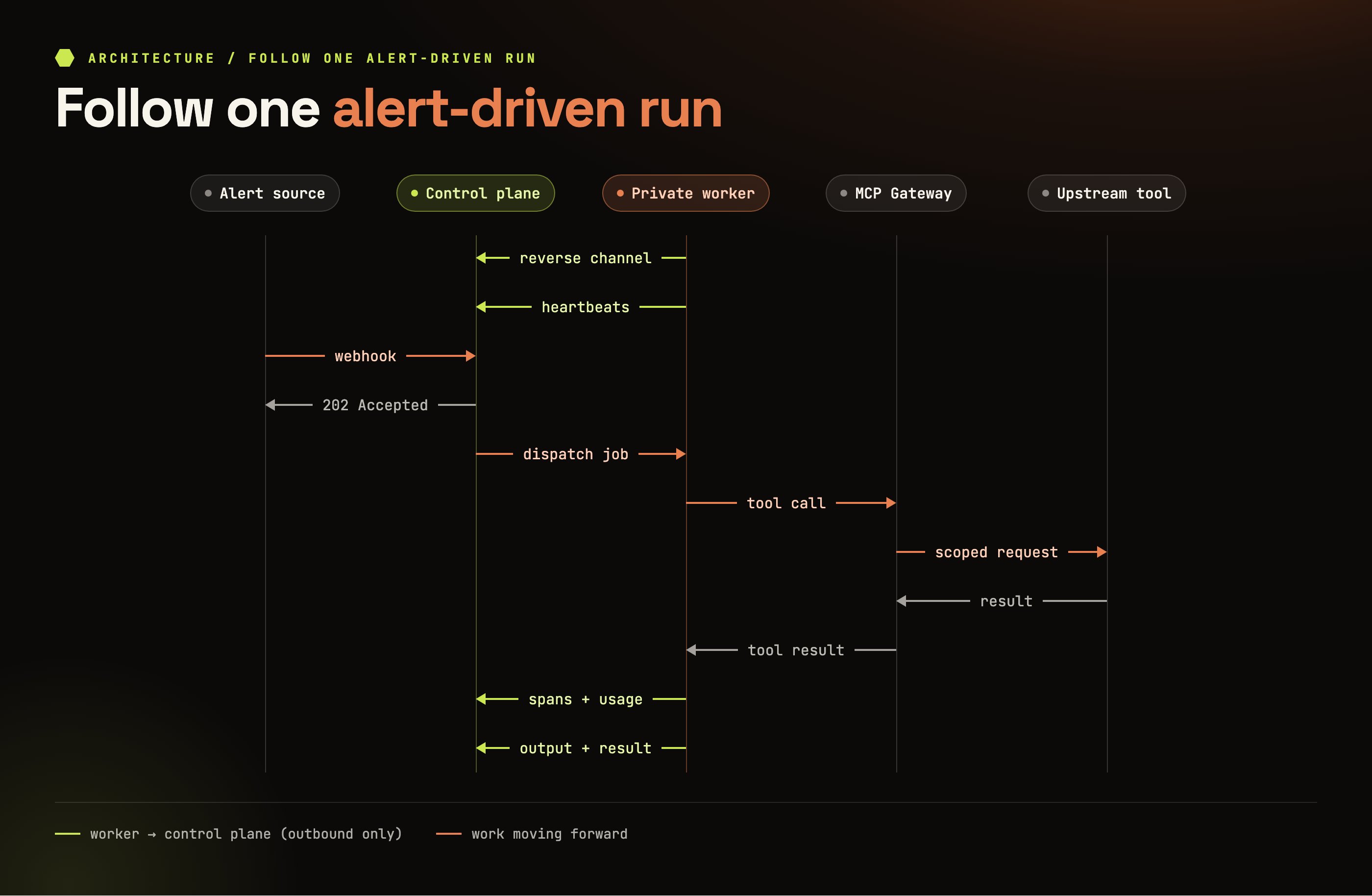 The following flow uses a private worker and tools accessed through the MCP Gateway:
### Step 1 — Accept and record the request
The inbound endpoint verifies the request and the agent's input schema validates the payload where
configured. A routed request creates a run with its origin recorded.
`202 Accepted` means execution was accepted for background processing. It does not mean the
investigation has succeeded.
### Step 2 — Deliver the job
The worker receives the prompt, alert input, correlation IDs, and required run-scoped credentials.
In this example, invocation uses the live outbound reverse channel.
### Step 3 — Gather evidence through tools and models
The worker performs the investigation. With MCP tools, it calls the gateway, which proxies to the
configured upstream server and supplies scoped authentication. Tool results return through that
path.
A direct tool client can use a different network path. Model content also goes to the configured
provider or gateway. Do not describe all tool and model traffic as direct worker-to-provider traffic
or as bypassing the control plane's gateway services.
### Step 4 — Report progress and any required decision
The worker emits tool spans, model spans, progress, and usage while execution continues. Tool spans
can include the actual arguments and results.
Where an action is gated for approval, the proposed action waits for the required decision before
execution. The run evidence and decision record should show that boundary. The available approval
interaction depends on the configured workflow and supported surface; this architecture example does
not establish a universal Slack approval control.
### Step 5 — Record the outcome
The worker reports completion or failure, final structured output, optional human-readable text, and
usage. Inspect the resulting run to verify what was actually done.
Durable evidence and an append-only audit log are different records. Do not infer that every run
field is immutable after completion simply because audit rows are append-only.
## What each entry point contributes
| Origin | Input contributed to the run |
| --------------------------------------------- | ---------------------------------------------------------- |
| **Schedule** | Stored prompt/input configuration. |
| **Inbound webhook** | The request body, subject to configured schema validation. |
| **Manual UI or API invocation** | The caller's prompt and input. |
| **Chat**, including routed Slack conversation | The user message and applicable session history. |
| **Platform MCP client** | The MCP caller's prompt and input. |
| **Agent-to-agent invocation** | The parent's request for the child agent. |
| **Workflow step** | Step input, often derived from a preceding step's output. |
Invoke and schedule APIs wrap run parameters under `input`. A webhook passes the whole request body
as the agent input. Preserve that distinction when tracing why a worker received an unexpected
payload.
### Workflows move outputs between environments
Each agent step is an ordinary run. The control plane captures its structured output and supplies it
as input to later steps, whose workers may run in different environments.
Workers receive their own step's job, not the entire workflow definition. The control plane
nevertheless handles the output being passed between them. A private worker does not make cross-step
data movement local by default.
### Agent-to-agent calls also carry data through the platform
For control-plane-mediated delegation, the parent invokes the child through the platform. The child
has its own run, and its output returns to the parent as a tool result with the corresponding run
and audit treatment.
A worker's A2A endpoint can also be called directly where reachable. Assess that direct path
separately rather than assuming every possible A2A call follows the mediated route.
## Credential masking and general sensitive data
| Data type | Documented treatment |
| ------------------------------------------------------------ | -------------------------------------------------------------------------------------------------------------------------------------- |
| **Known run-scoped secret values** | Replaced with `***REDACTED***` in worker events, recursively across names, content, payloads, and metadata before evidence is shipped. |
| **General PII**, including names, emails, IPs, and free text | No built-in PII classifier automatically detects and removes it. |
| **Tool results, logs, messages, output, and artifacts** | Can carry sensitive content into the record if the worker emits it. |
| **Locally read bulk data that is not emitted** | Reading it locally does not by itself add the entire dataset to run evidence. |
| **Another account's platform data** | Protected by account scoping and authorization. |
**Secret masking is not general content redaction** A returned log line can have a known token
masked while still retaining a person's email address or an internal IP address. Likewise, “raw data
stays local” is only accurate for data that is not subsequently placed in a tool result, span, model
request, log, message, artifact, or output sent elsewhere. Emit bounded findings and the evidence
needed to support them rather than large unfiltered dumps.
Platform event masking concerns the evidence path. It is not a claim that authentication credentials
are never transmitted to the legitimate upstream service that needs them.
## Control exposure deliberately
Two separate choices affect exposure:
| Choice | What to determine |
| ----------------------------------- | ------------------------------------------------------------------------------------------------------------------------------------- |
| **What the control plane receives** | Full run content versus an agreed selective-sharing configuration, such as withholding trace/tool content and retaining a run ledger. |
| **Where it is hosted** | Komodor-hosted SaaS versus a control plane arranged in your own environment. |
Hosted SaaS with full sharing is the documented default. Discuss strict-egress, selective-sharing,
and in-environment control-plane requirements with Komodor. Self-hosting is arranged with Komodor
rather than started as a console installation flow; this page does not provide a supported “send
nothing” switch.
Withholding run content limits features that rely on it, including quality scoring, LLM-as-judge
evaluation, cross-run search, fleet analysis, and operational memory. An in-environment control
plane alone also does not prevent an external model or tool provider from receiving content; review
those destinations independently.
## Validate the flow with a representative run
Inspect the run's input, tool arguments/results, logs, messages, output, artifacts, and usage.
Confirm that sensitive data is absent where intended and that known run-scoped credentials are
masked in emitted events.
Also check provider and gateway destinations. Evidence inspection shows what KAOP recorded; it is
not a complete network-egress audit of custom worker code.
## Next steps
Identify the caller and protocol that started the work
Review account isolation, credential handling, audit, and deployment requirements
Distinguish platform access from upstream tool access
Inspect the recorded execution
## Related topics
- [Control plane](/get-started/architecture/control-plane.md)
- [Datadog Investigator](/manage-your-agents/build/catalog/datadog-investigator.md)
- [AWS Cost Analyzer](/manage-your-agents/build/catalog/aws-cost-analyzer.md)
- [Data handling & redaction](/security-and-governance/architecture-considerations/data-handling-redaction.md)
- [Grafana Investigator](/manage-your-agents/build/catalog/grafana-investigator.md)
The following flow uses a private worker and tools accessed through the MCP Gateway:
### Step 1 — Accept and record the request
The inbound endpoint verifies the request and the agent's input schema validates the payload where
configured. A routed request creates a run with its origin recorded.
`202 Accepted` means execution was accepted for background processing. It does not mean the
investigation has succeeded.
### Step 2 — Deliver the job
The worker receives the prompt, alert input, correlation IDs, and required run-scoped credentials.
In this example, invocation uses the live outbound reverse channel.
### Step 3 — Gather evidence through tools and models
The worker performs the investigation. With MCP tools, it calls the gateway, which proxies to the
configured upstream server and supplies scoped authentication. Tool results return through that
path.
A direct tool client can use a different network path. Model content also goes to the configured
provider or gateway. Do not describe all tool and model traffic as direct worker-to-provider traffic
or as bypassing the control plane's gateway services.
### Step 4 — Report progress and any required decision
The worker emits tool spans, model spans, progress, and usage while execution continues. Tool spans
can include the actual arguments and results.
Where an action is gated for approval, the proposed action waits for the required decision before
execution. The run evidence and decision record should show that boundary. The available approval
interaction depends on the configured workflow and supported surface; this architecture example does
not establish a universal Slack approval control.
### Step 5 — Record the outcome
The worker reports completion or failure, final structured output, optional human-readable text, and
usage. Inspect the resulting run to verify what was actually done.
Durable evidence and an append-only audit log are different records. Do not infer that every run
field is immutable after completion simply because audit rows are append-only.
## What each entry point contributes
| Origin | Input contributed to the run |
| --------------------------------------------- | ---------------------------------------------------------- |
| **Schedule** | Stored prompt/input configuration. |
| **Inbound webhook** | The request body, subject to configured schema validation. |
| **Manual UI or API invocation** | The caller's prompt and input. |
| **Chat**, including routed Slack conversation | The user message and applicable session history. |
| **Platform MCP client** | The MCP caller's prompt and input. |
| **Agent-to-agent invocation** | The parent's request for the child agent. |
| **Workflow step** | Step input, often derived from a preceding step's output. |
Invoke and schedule APIs wrap run parameters under `input`. A webhook passes the whole request body
as the agent input. Preserve that distinction when tracing why a worker received an unexpected
payload.
### Workflows move outputs between environments
Each agent step is an ordinary run. The control plane captures its structured output and supplies it
as input to later steps, whose workers may run in different environments.
Workers receive their own step's job, not the entire workflow definition. The control plane
nevertheless handles the output being passed between them. A private worker does not make cross-step
data movement local by default.
### Agent-to-agent calls also carry data through the platform
For control-plane-mediated delegation, the parent invokes the child through the platform. The child
has its own run, and its output returns to the parent as a tool result with the corresponding run
and audit treatment.
A worker's A2A endpoint can also be called directly where reachable. Assess that direct path
separately rather than assuming every possible A2A call follows the mediated route.
## Credential masking and general sensitive data
| Data type | Documented treatment |
| ------------------------------------------------------------ | -------------------------------------------------------------------------------------------------------------------------------------- |
| **Known run-scoped secret values** | Replaced with `***REDACTED***` in worker events, recursively across names, content, payloads, and metadata before evidence is shipped. |
| **General PII**, including names, emails, IPs, and free text | No built-in PII classifier automatically detects and removes it. |
| **Tool results, logs, messages, output, and artifacts** | Can carry sensitive content into the record if the worker emits it. |
| **Locally read bulk data that is not emitted** | Reading it locally does not by itself add the entire dataset to run evidence. |
| **Another account's platform data** | Protected by account scoping and authorization. |
**Secret masking is not general content redaction** A returned log line can have a known token
masked while still retaining a person's email address or an internal IP address. Likewise, “raw data
stays local” is only accurate for data that is not subsequently placed in a tool result, span, model
request, log, message, artifact, or output sent elsewhere. Emit bounded findings and the evidence
needed to support them rather than large unfiltered dumps.
Platform event masking concerns the evidence path. It is not a claim that authentication credentials
are never transmitted to the legitimate upstream service that needs them.
## Control exposure deliberately
Two separate choices affect exposure:
| Choice | What to determine |
| ----------------------------------- | ------------------------------------------------------------------------------------------------------------------------------------- |
| **What the control plane receives** | Full run content versus an agreed selective-sharing configuration, such as withholding trace/tool content and retaining a run ledger. |
| **Where it is hosted** | Komodor-hosted SaaS versus a control plane arranged in your own environment. |
Hosted SaaS with full sharing is the documented default. Discuss strict-egress, selective-sharing,
and in-environment control-plane requirements with Komodor. Self-hosting is arranged with Komodor
rather than started as a console installation flow; this page does not provide a supported “send
nothing” switch.
Withholding run content limits features that rely on it, including quality scoring, LLM-as-judge
evaluation, cross-run search, fleet analysis, and operational memory. An in-environment control
plane alone also does not prevent an external model or tool provider from receiving content; review
those destinations independently.
## Validate the flow with a representative run
Inspect the run's input, tool arguments/results, logs, messages, output, artifacts, and usage.
Confirm that sensitive data is absent where intended and that known run-scoped credentials are
masked in emitted events.
Also check provider and gateway destinations. Evidence inspection shows what KAOP recorded; it is
not a complete network-egress audit of custom worker code.
## Next steps
Identify the caller and protocol that started the work
Review account isolation, credential handling, audit, and deployment requirements
Distinguish platform access from upstream tool access
Inspect the recorded execution
## Related topics
- [Control plane](/get-started/architecture/control-plane.md)
- [Datadog Investigator](/manage-your-agents/build/catalog/datadog-investigator.md)
- [AWS Cost Analyzer](/manage-your-agents/build/catalog/aws-cost-analyzer.md)
- [Data handling & redaction](/security-and-governance/architecture-considerations/data-handling-redaction.md)
- [Grafana Investigator](/manage-your-agents/build/catalog/grafana-investigator.md)